![CR circle transparent background white inside.png]](https://help.classreach.com/hs-fs/hubfs/CR%20circle%20transparent%20background%20white%20inside.png?height=40&name=CR%20circle%20transparent%20background%20white%20inside.png)
There are two locations in ClassReach that Guardians and Students can print their progress reports:
Student Term Summary Page:
- Navigate to the Term Summary Page:
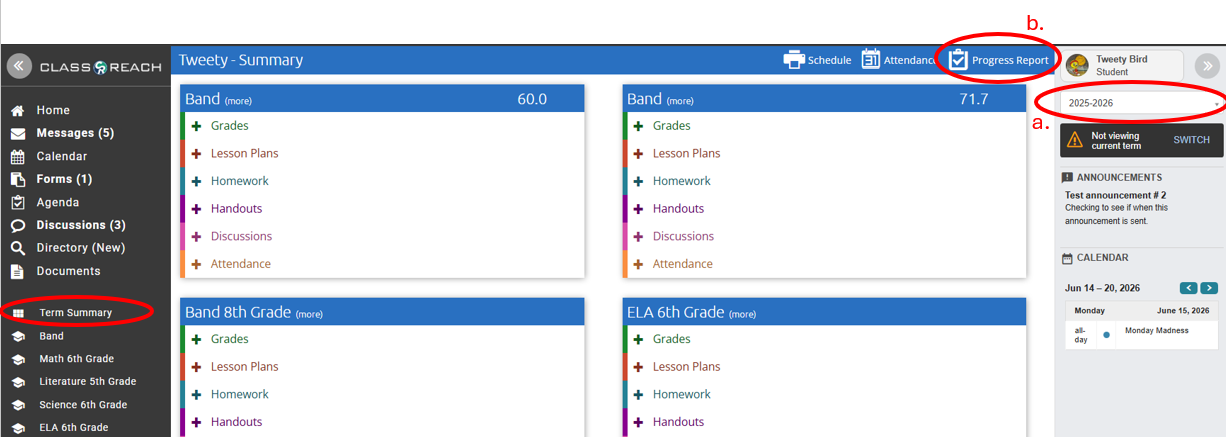
- Pay close attention to the School Year - you can adjust that depending on which year you are trying to print the progress report for
- In the upper blue header bar, you will see a link entitled "Progress Report"; click on that link to generate a progress report.
Profile Page:
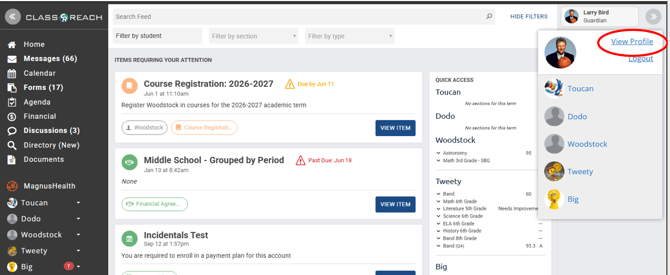
- Navigate to your Profile - in the upper right side of your screen as circled in the mock-up below:
- From the Profile page
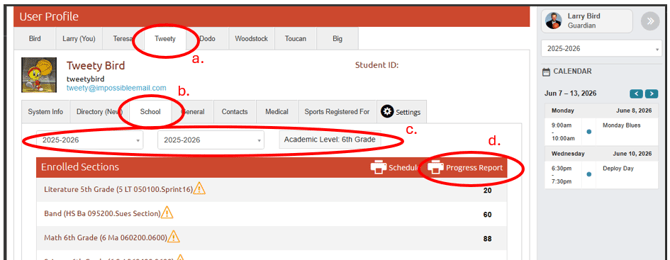
- Find the student you want to print the report for (students will only have themselves)
- Navigate to the School page
- Pay close attention to the School Year and Term and Academic Level - you can adjust those depending on which year/term you are trying to print the progress report for
- Click on the Progress Report link
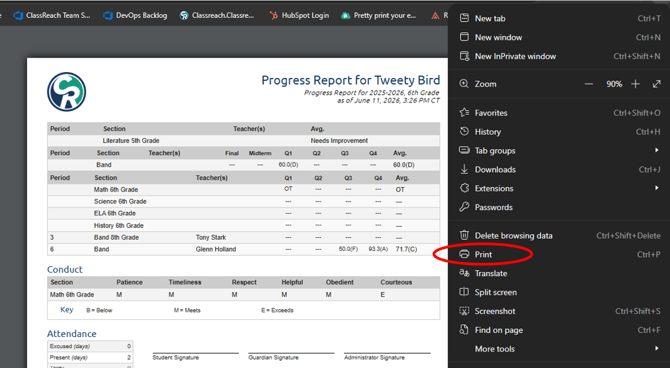
- The Progress Report will display in a new browser window where you can view as well as print if you click on the three dots in the upper right of most browsers which drops down a menu as shown below: