![CR circle transparent background white inside.png]](https://help.classreach.com/hs-fs/hubfs/CR%20circle%20transparent%20background%20white%20inside.png?height=40&name=CR%20circle%20transparent%20background%20white%20inside.png)
The All User messaging groups are defined by the school year they are associated with. The title of the group will contain the school year, such as All Users (2026-2027):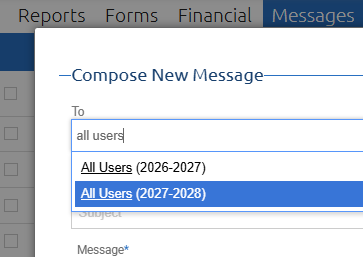
For a guardian to be included in this group, they must have at least one active student enrolled/assigned an academic level for the school year specified. If a family is in the middle of applying, they wouldn't be included. If a school has not yet advanced a student to the next year, say 2027-2028, and thus don't have an academic level assigned, they wouldn't be included in the 27-28 All Users Group.
The group is decided at the time the email is sent. A database query gathers up all qualified users and includes them on the message. The could explain why sending an All Users message on one day may reach different people than a day later as user status and academic level data changes constantly.