![CR circle transparent background white inside.png]](https://help.classreach.com/hs-fs/hubfs/CR%20circle%20transparent%20background%20white%20inside.png?height=40&name=CR%20circle%20transparent%20background%20white%20inside.png)
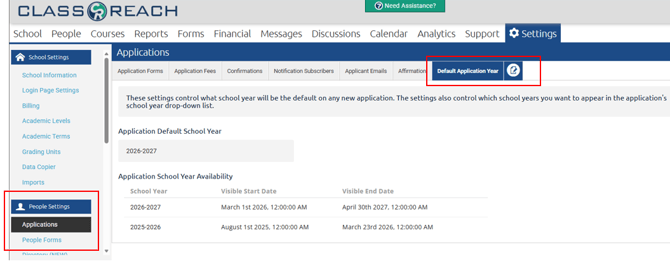
Schools often desire to control when their school is accepting applications as well as which years are available to apply to. The Default Application Year page in People Settings> Applications is where Administrators can configure those settings:
-
Application Default School Year field is what controls which school year will be the default when a new applicant begins their application process. This is a drop-down list and will contain options from viable school years. (you won't see prior school years in the list, only current and future)
- Application School Year Availability - this section is where you can set the start and end dates for visibility to your applicants.
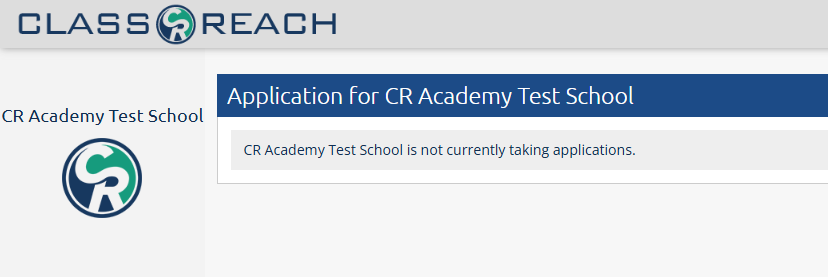
- If you are NOT accepting applications, then all visibility end dates should be prior to today. When you configure all the school years listed to not be visible, then when an applicant accesses your APPLY url, (<schoolname>.ClassReach.com/Apply), they will see the following message:
- If you are NOT accepting applications, then all visibility end dates should be prior to today. When you configure all the school years listed to not be visible, then when an applicant accesses your APPLY url, (<schoolname>.ClassReach.com/Apply), they will see the following message:
NOTE: While applicants can only apply to school year's you've configured as visible, an admin can still make changes and adjust that date in the application.
For example, if you are making an exception and allowing a student to transfer in late after the application period, you could allow them to apply to a future year and then in the Admin view of the application, adjust that school year to the current year.