![CR circle transparent background white inside.png]](https://help.classreach.com/hs-fs/hubfs/CR%20circle%20transparent%20background%20white%20inside.png?height=40&name=CR%20circle%20transparent%20background%20white%20inside.png)
New and Improved
Standards-Based Grading - Basic Tier schools and above now have the option to use a brand new feature that lets schools implement Standards-Based Grading for individual courses and report the students' standards progress independent of the customary grading system. This new feature can be turned on, when requested, by Basic Tier and above schools in order to set up courses for the 2026-2027 school year. Knowledge Base articles describing this feature in detail will be posted as soon as possible.
Paginated Reports - We have deployed a new and improved Reports option for all schools that uses MS Power BI reports. All reports are still available via the ClassReach Reports page and then clicking the green +Reports button. There is a new, enhanced Reports menu that now lists all the reports by category. The mechanics of creating and saving the reports (which includes exporting to PDF, CSV, etc) is different and is detailed in the Reports Overview article.
The new reports available are listed below along with their ClassReach tier. Additional Power BI reports are planned and will be listed on the monthly Release Notes.
All Schools
- Course Section Rosters - rosters of each section with teachers and students
- Teacher Schedule Report - a report of Teacher Schedules by Academic Term, similar to the Student Schedule
- Financial Transaction Report - by Category then Customer (compressed) - a detailed transaction report including financial account(s), category(s) and customers. The format is compressed for fewer pages.
- Financial Transaction Report - by Customer then Invoice (compressed) - a detailed transaction report including organized as titled. The format is compressed for fewer pages.
Basic Tier and Above Schools
- Financial Transaction Report - by Category then Customer (formatted) - a detailed transaction report including organized as titled. Report is formatted with total charges/payments by customer in each category.
- Financial Transaction Report - by Customer then Invoice (formatted) - a detailed transaction report including organized as titled. Formatted page break on customer.
- Financial Transaction Report - Charges Roll Up - a detailed report than shows total charges by Category for a set date range. The report initially displays as compressed by category and is expandable to details by family.
- Progress Report - SBG-Only Sections - this report is available for schools using Standards-Based Grading. It displays a full Progress Report for all students that are enrolled in SBG sections and only for SBG sections. It shows the students' Standards, Conduct Items, Comments and Attendance, but does not display any Grades or Graded Items.
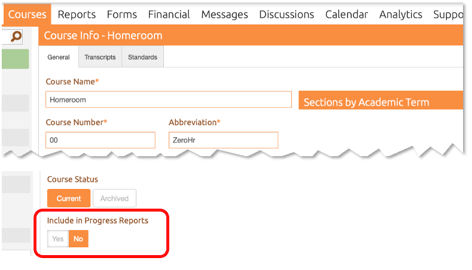
Progress Reports - Admins now have the option on the Course page to choose whether or not the Course will show on the Progress Report. Schools that use a Course for campus rosters, homeroom, sports, etc may now choose "No" to "Include in Progress Reports?" and the course will be hidden from the Progress Report.
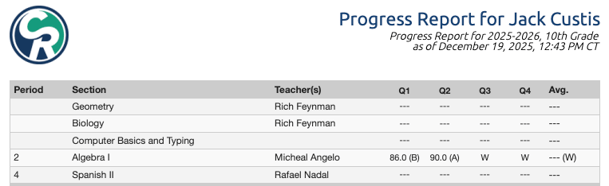
Progress Report - Now shows Dropped Sections - If a student is dropped from a section it will be reflected on the Progress Report with a "W" for withdrawal. This allows schools to more accurately reflect a student's courses for a given year, especially when transferring to another school. Grading Units in the withdrawn section will show a grade if appropriate or a "W" for no grades in that Grading Unit and the Avg. grade will be a "W." If the student never received any grades in the class and you don't want that section to show on the Progress Report, using "Delete" instead of "Dropped" may be a better option.
Refactor Announcement Start/End Dates - When creating new announcements, we adjusted the function of setting start/end dates to behave like the homework start/end dates where the start date is the pivot point and the end date adjusts automatically. Previously, the start date was restricted by the end date and it wasn't intuitive that the admin needed to adjust the end date first before the start date.
Gradebook - Guardian/Student view - Sort by Due Date - this change will display assignments by Due Date order as opposed to previously ordering by Start Date.
Bug Fixes - Thank you for your patience!
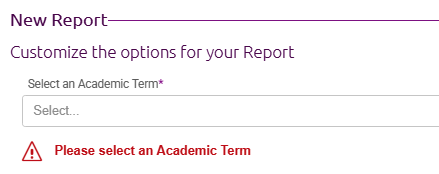
Attendance Report - "Academic Term Not Selected" Error missing - Academic Term is required to be selected to run this report, but it was allowing users to run the report without it and only giving a generic "Error" message. This has been fixed to not allow Admins to click Next until an Academic Term is entered. It allows gives a warning in red text.
Document download file type error - Some teachers and students were experiencing pdf files that would not download from the Handouts section of a Course/Section. Although they were uploaded as a pdf type, when attempting to download the file would appear as an html type. There were two fixes - a fix to allow characters in the filename that were being treated as invalid and an internal content disposition fix.